
The Silent Rejection: How My Dream Job Slipped Away
I spent three entire days perfecting what I honestly thought was the ultimate resume. I bought a highly rated, beautiful template online that featured elegant graphics, a stylish sidebar, and tiny progress bars for my skills. I felt incredibly confident as I clicked the submit button for a role I was perfectly qualified for.
I waited for weeks, checking my inbox every single morning, but I never heard a single word back from the company. A few months later, I met a hiring manager from that exact company at a local networking event. When I mentioned my application, she looked up my name in their system right there on her tablet.
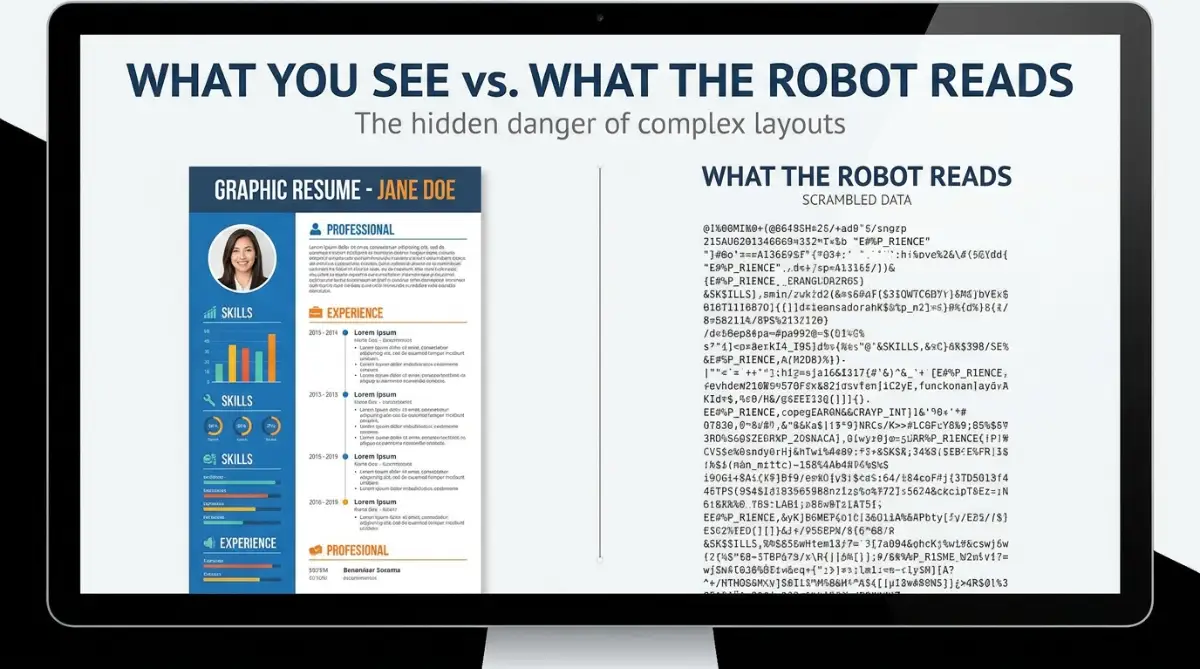
My heart completely sank when I saw what my beautiful document looked like on her screen. It was just a massive wall of scrambled letters, missing dates, and completely broken sentences.
The software they used to scan applications had completely destroyed my fancy layout, making me look highly unprofessional. I realized in that painful moment that I had been unintentionally sabotaging my own career for months.
I was not alone in this deeply frustrating experience. Millions of highly skilled, hardworking people are facing this exact same invisible wall every single day. You spend hours tailoring your cover letter, matching keywords, and putting your best foot forward.
The automated systems instantly throw your application into a digital trash can before a human ever sees it. This silent rejection creates a massive amount of self-doubt and emotional exhaustion for job seekers.
People start to believe they are not good enough or lack the right experience for their chosen field. The constant ghosting from employers heavily drains your mental peace, making the entire job hunt feel completely hopeless.
The reality is that your skills are likely perfectly fine, but your formatting is actively working against you. You are essentially speaking a beautiful language that the robot gatekeepers simply cannot understand.
Decoding the Robot Gatekeeper: What Actually Happens Behind the Scenes
To fix this massive problem, we first need to understand how Applicant Tracking Systems actually process your documents. Imagine an ATS as a highly organized but completely blind librarian.
This librarian cannot see beautiful colors, elegant borders, or creative page designs. Instead, the software simply reads text from left to right, and top to bottom, exactly like reading a basic paperback novel.
When you download a heavily designed template, it is usually built using complex digital layers. The software tries to strip away all the visual elements to just extract the raw words underneath.
If those words are trapped inside floating boxes or invisible tables, the robot gets deeply confused. It ends up grabbing pieces of your education, mixing it with your contact details, and throwing it all into the wrong database fields.
The Danger of the Modern Two-Column Layout
One of the most popular trends in modern resume design is splitting the page into two separate vertical columns. You might put your work experience on the wide left side and your contact details and skills on the narrow right side.
Visually, this looks amazing and saves a lot of physical space on a printed piece of paper. However, this is the exact moment things go terribly wrong for the digital scanning software.
Because the robot reads strictly from left to right across the entire width of the page, it does not respect your invisible column boundaries. It will read a line from your job description on the left, and instantly combine it with a random skill listed on the right.
This creates absolute gibberish that makes you look like you cannot form a proper sentence. For example, your resume might say "Managed a team of ten" on the left, and "HTML Coding" on the right.
The computer reads this as one single thought: "Managed a team of ten HTML Coding." When the recruiter searches the database for specific leadership keywords, your scrambled profile will never show up in their results.
Why Invisible Tables and Text Boxes Are Silent Killers
Many people rely on Microsoft Word or basic design tools to build their professional documents. To make things line up perfectly, these programs often use hidden tables or floating text boxes behind the scenes.
You might not even realize they are there, but the digital scanner definitely notices them immediately. Most older, enterprise-level applicant tracking systems physically cannot read the text hidden inside these floating boxes.
If you put your email address and phone number inside a customized header box, the system might completely ignore it. The software will create a blank profile for you because it thinks you forgot to provide any contact information.
I used to put my phone number and email in a beautiful colored box at the top to save space, but I quickly realized the system was ignoring it entirely. I noticed I was constantly having to manually re-type my contact details into the company's web form after uploading my file. Once I removed that text box and typed my details normally on the page, the software instantly recognized everything perfectly.
Graphic Elements: The Progress Bar Illusion
We all want to stand out and show exactly how good we are at certain technical skills. Downloaded templates often come with cute little graphics, like five empty circles where you fill in four of them to show your expertise.
You might use a little battery graphic to show you are highly proficient in digital marketing or graphic design. While these look incredibly cool to human eyes, they are completely invisible and useless to the software.
The computer cannot assign a numerical value to a colored picture on a page. It scans the area, sees a strange image file, ignores it, and moves on without recording your skill.
Instead of showing a graphic of four stars next to the word "Leadership," you need to use plain, descriptive words. Simply write out terms like "Advanced Proficiency," "Expert," or "Working Knowledge" right next to the specific skill.
This ensures the software actually captures the keyword and accurately ranks you against other candidates.
The Problem with Custom Fonts and Unknown Symbols
Another major issue with downloaded templates is the heavy use of highly customized, non-standard fonts. Designers love to use unique typography to make the document look modern, fresh, and slightly different from everyone else.
If the company's internal software does not have that specific custom font installed on their servers, things get very messy. The system will forcibly try to translate your special letters into a standard font like Arial or Times New Roman.
During this forced translation process, special characters, unique bullet points, and elegant letters often turn into completely random symbols. Your carefully crafted bullet point might suddenly start with a weird question mark or a square box.
This makes your professional document look like it has a massive computer virus attached to it. Always stick to highly common, widely accepted fonts like Calibri, Arial, Helvetica, or Garamond.
These standard fonts guarantee that every single system in the world will read your words exactly as you originally typed them.
Section Headings: Stop Being Overly Creative
When trying to stand out, many applicants try to rename the basic sections of their document to sound more exciting. Instead of writing "Work Experience," they might write something like "My Professional Journey" or "Career Milestones."
Instead of writing "Education," they might label that section "Academic Adventures." This creativity shows great personality, but it completely breaks the automated mapping process.
The software is specifically programmed to look for standard, exact phrases to know where to put your information. When it scans the page, it actively searches for the exact phrase "Work Experience" to grab your past job titles.
If it sees "My Professional Journey," the robot does not understand what that means, so it skips the section entirely. As a result, the database tells the hiring manager that you have absolutely zero work history.
Always use the most boring, traditional, standard headings you can possibly think of. Terms like "Education," "Work Experience," "Skills," and "Summary" are exactly what the computer is desperately looking for.
The File Format Debate: PDF vs Microsoft Word
There is always a massive debate online about whether you should send a PDF file or a standard Word document. Downloaded templates almost always encourage you to save the final product as a PDF to lock the beautiful design in place.
For the most part, sending a PDF is a very smart move because it prevents human recruiters from accidentally deleting a line of your text. However, some very old, outdated tracking systems still heavily struggle to read complex PDF files accurately.
If the PDF was created using a heavy design program like Adobe Illustrator, the text might be saved as a flat image rather than readable words. If you ever try to highlight the text on your PDF and you cannot select individual words, the robot cannot read it either.
A great rule of thumb is to always follow the exact instructions listed on the specific job application page. If the company specifically asks for a Word document, never upload a PDF just because it looks prettier on your screen.
Always prioritize the technical requirements of the employer over your personal design preferences. If the system cannot process your file type, your beautiful application goes straight into the digital void.
How to Test Your Own Document Today
You do not need to wait for your next job application to see if your layout is secretly failing. There is an incredibly simple test you can perform right now on your personal computer.
Open up your current resume file, press the keyboard shortcut to select all the text, and copy everything. Next, open up a completely blank, basic text editor like Notepad on Windows or TextEdit on a Mac.
Paste everything you just copied directly into that completely plain, unformatted white screen. What you see on that plain screen is almost exactly what the automated robot scanner sees when it processes your file.
If your sentences are broken in half, if your job titles are sitting below the wrong company names, or if your skills are completely missing, you have a major problem. This raw text view strips away all the magic and shows you the harsh reality of your document structure.
If the plain text version is a total mess, you need to urgently rebuild your document using a much simpler layout. It might hurt to say goodbye to that beautiful, expensive design, but winning the job interview is always more important than having the prettiest paper.
Mastering the ATS Game: Insider Secrets from Hiring Managers
Once you strip away the confusing graphics and hidden text boxes from your document, you are ready for the next major step. Passing the initial software scan is not just about having a clean layout on a white page.
You actually have to speak the exact language the automated system is programmed to understand. Hiring managers tell these systems exactly which words are required for a candidate to move forward in the process.
If those specific words are missing from your profile, the robot assumes you lack the required experience for the role. This is where understanding keyword optimization completely changes your entire job search strategy.
Many applicants write their past job descriptions based on what sounds impressive to them personally. However, the system does not care about fancy vocabulary or creative descriptions of your daily tasks.
If the official job posting specifically asks for a "Client Relations Expert," you cannot write "Customer Service Champion" on your application. A human recruiter knows those two phrases mean the exact same thing, but the blind robot scanner does not.
You have to mirror the exact phrasing used in the job description to get a high compatibility score. This level of precise matching requires patience, but it heavily increases your chances of getting a callback.
The Magic of Contextual Keyword Placement
Simply dropping a massive list of keywords at the bottom of your page is a terrible strategy. Modern tracking software is incredibly smart and can easily detect when someone is just throwing random words together.
The system wants to see those important terms used naturally inside your actual work experience bullet points. Instead of just listing "Data Analysis" in a side column, write a full sentence about how you used it.
You could write, "Used data analysis to increase monthly team productivity by twenty percent." This proves to the software that you actually have hands-on experience with that specific skill.
Context makes your document highly valuable to both the automated system and the human who eventually reads it. Just as digital creators study why AI design software can never truly replace human brand creators, you must realize that a robot cannot appreciate your unique human impact unless you explain it plainly.
You have to spell out your achievements in a logical, structured way that clearly connects your skills to real-world results.
Mastering the File Naming Convention
This might sound incredibly basic, but you would be shocked at how many people fail at naming their digital files. When a hiring manager downloads fifty applications from their database, they see the raw file names you created.
If your document is saved as "Resume_Final_Updated_Version3," you instantly look disorganized and slightly unprofessional. The automated system also uses your file name to quickly verify your basic identity.
Always name your document using a clean, professional format like "Firstname_Lastname_Resume." You can also add the specific job title you are applying for, which shows excellent attention to detail.
Following these tiny formatting rules acts exactly like proven risk management strategies for first-time digital entrepreneurs looking to secure their future. You are essentially removing all the tiny variables that could accidentally get your application thrown away.
Little details build massive trust with the human resource department before you even walk in for an interview.
The Silent Career Killers: Traps You Must Avoid
Even with a perfectly clean layout, human desperation often leads job seekers to make terrible technical mistakes. When you are desperately trying to get an interview, the internet often gives you highly questionable advice.
Some of these popular "hacks" might have worked a decade ago, but today they will instantly destroy your reputation. Modern tracking systems are backed by incredibly advanced pattern recognition technology that flags unusual behavior.
Desperation makes us take shortcuts, but those shortcuts almost always lead to permanent digital blacklisting.
The White Text Cheating Method
There is a massive, highly destructive myth floating around social media about hiding keywords. Influencers often tell desperate applicants to copy the entire job description and paste it at the bottom of their page.
They then tell you to change the font color to completely white, making the text invisible to human eyes. The theory is that the robot will read the hidden words and give you a perfect match score.
This is absolutely the worst thing you could possibly do for your professional career. Modern tracking systems automatically strip away all font colors and present the text as a uniform black color to the recruiter.
When the hiring manager opens your profile, they will see a massive block of stolen text at the bottom. You will instantly be rejected for being dishonest, and your name might be permanently banned from their internal systems.
Always rely on honest, natural skill integration rather than cheap tricks that ruin your personal brand.
Over-Formatting Your Headers and Footers
Another major pitfall is placing your most important contact information inside the document headers or footers. Microsoft Word has a dedicated tool for adding beautiful headers that repeat on every single page.
While this makes a printed physical copy look lovely, many older software scanners completely ignore header data. The system is programmed to scan the main body of the text and ignores the extreme top and bottom margins.
If your phone number and email address are locked inside a footer, the system creates a blank profile for you. The employer might love your experience, but they literally have no way to contact you for an interview.
Always type your name, city, phone number, and professional email directly into the normal, main body of your document.
Ignoring the Standard Section Hierarchy
People often try to arrange their information based on what they think looks visually balanced on the screen. They might put their education at the very top, their skills on the side, and their work experience at the bottom.
This random jumping around deeply confuses the software's ability to create a proper chronological timeline of your career. The software expects a highly predictable, standard flow of information to map everything correctly.
According to major human resource management standards, recruiters expect to see a brief summary, followed immediately by professional experience, then education.
If you mix up this standard order, the scanner might mix up your university dates with your past job dates. Suddenly, the system thinks you were a senior manager when you were actually just starting your freshman year of college.
Keep the hierarchy boring, predictable, and incredibly easy for a simple machine to digest quickly.
The Hidden Danger of Unprofessional Hyperlinks
Adding links to your online portfolio or professional networking profile is an excellent way to show off your work. However, hiding those links behind vague words can completely break the automated scanning process.
If you just write the word "Portfolio" and attach a hidden hyperlink to it, the robot might not extract the actual web address. Some systems strip out the invisible HTML code, leaving the recruiter with a dead, unclickable word.
Always paste the entire, raw URL directly onto the page so anyone can copy and paste it if needed. Make sure you clean up your custom links so they look professional and do not contain random strings of numbers.
A clean link strategy ensures that recruiters can easily find your past projects without wrestling with broken software.
Your Weekend Action Plan for Job Search Success
Fixing your application strategy does not have to be an overwhelming, stressful experience that takes weeks to finish. You just need to sit down with a clear mind and completely rebuild your foundation from the ground up.
Start by finding a completely plain, single-column text template that has absolutely zero graphical elements attached to it. Transfer your entire work history into this plain document using standard, widely recognized fonts like Arial or Calibri.
Go through your bullet points and aggressively remove any invisible tables, text boxes, or custom bullet point symbols. Replace any fancy section titles with the boring, standard names that every computer system actively looks for.
You should also spend time reading through detailed university career development resources to understand exactly what modern hiring managers actually want to read.
Once your document is stripped down to the raw essentials, start naturally weaving in the exact keywords from your target job description. This simple weekend reset will entirely change the way companies interact with your professional profile.
Top Questions About Navigating Applicant Tracking Systems
Does a plain text document look unprofessional to human recruiters?
Not at all, human recruiters actually prefer clean, easily readable text over messy, confusing graphics. A highly organized, simple document shows that you respect their time and understand basic professional communication.
Can the automated system read bold and italic formatting?
Yes, standard bolding and italics are perfectly safe and will not confuse the digital scanning software. Using bold text for your job titles or company names actually helps human readers quickly scan your timeline later.
Should I include a professional photograph on my application?
You should never include a picture unless the specific job application explicitly demands one. Photos confuse the software scanners and can introduce massive legal issues regarding unconscious hiring bias for the employer.
How exactly do keyword matches work in the software?
The software compares the words on your page directly against the words listed in the official job description. It calculates a percentage score based on how many required skills you naturally included in your bullet points.
Are all applicant tracking platforms exactly the same?
There are hundreds of different software brands, and some are much smarter and more flexible than others. Because you never know which software a company uses, it is always safest to use the most basic formatting possible.
I know how incredibly exhausting the modern job hunt can be when you feel like nobody is listening. I completely turned my own career around the exact day I stopped using those fancy downloaded designs and embraced simple, boring formatting. Just clean up your layout tonight, use the right words, and watch how quickly those interview invitations start landing in your inbox!
Disclaimer: The information provided in this article is strictly for educational and career development purposes. The algorithms and software used by individual companies frequently update, and there is no absolute guarantee of securing employment. Always tailor your job search strategy to the specific technical requirements requested by the hiring organization.